
ThriftAI: Profit Identifier
smallstack ApSShopping
4.7523.00 Reviews
- Version
- 1.0.77
- Installs
- 100.00K
- Age Rating
- Everyone
Screenshots
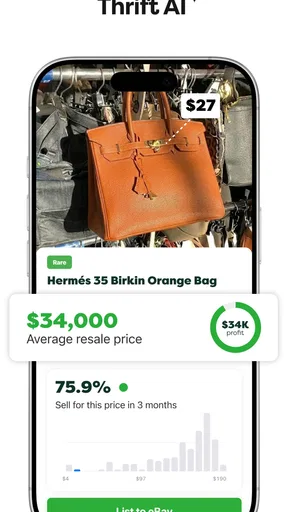

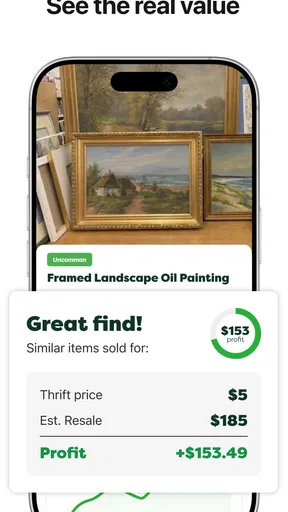
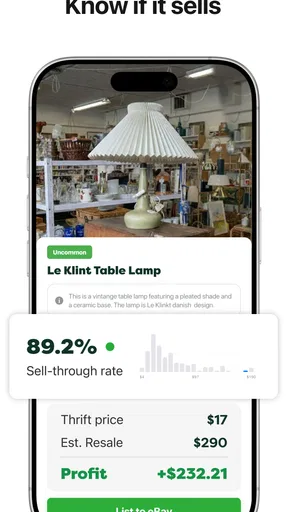
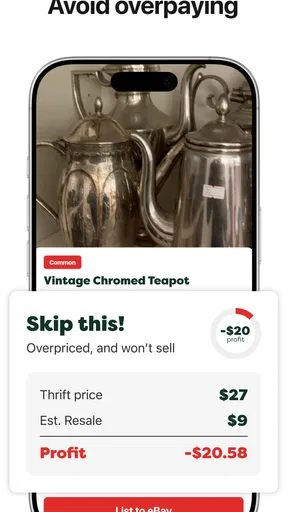
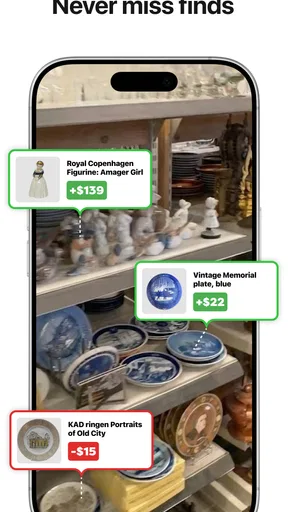
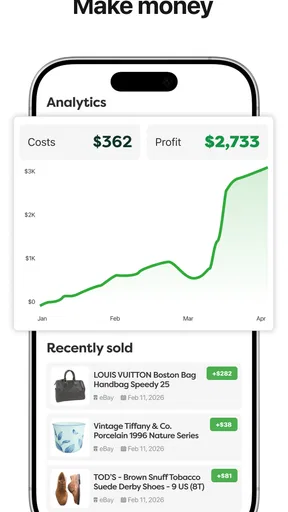
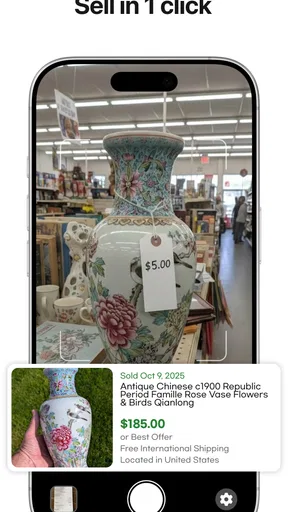
Our Review of ThriftAI: Profit Identifier
 Analysis by Appyee
When a thrift-store find looks promising, the hard part is often deciding whether it is genuinely worth buying or just tempting at the moment. ThriftAI: Profit Identifier is a shopping app from smallstack ApS built around using an AI-powered scan to help assess an item’s profit potential. I see the appeal: it can give resellers a quick starting point while they are browsing, but its estimate should be treated as one clue, not a promise of what an item will sell for.
Where a quick scan can fall short
The app’s central idea sounds simple, yet the result is only as useful as the item you present and the context you bring to the decision. A scan can help you pause and evaluate a possible buy, but it cannot make your budget, preferred resale platform, storage space, or appetite for risk irrelevant. I would use its output to decide what deserves a closer look rather than treating it as an automatic green light.
This distinction matters most with items that have several versions, visible wear, missing parts, or an unclear brand. If I were considering a used jacket, for example, I would look at its condition and construction instead of assuming that an attractive scan result settles the question. For anything I might resell, I would also check what comparable items actually seem to be selling for and account for the effort involved. A promising potential margin can shrink quickly when an item needs cleaning, repair, careful packing, or a long wait for the right buyer.
That makes the app a better fit for people who already enjoy browsing secondhand shops and want another way to screen possible purchases. It is less suited to someone looking for guaranteed income, a substitute for market research, or a tool that can make every buying decision for them. I would be particularly cautious about using any instant estimate to justify spending money I cannot comfortably tie up.
Setup checks before you rely on it
ThriftAI is free to download and is listed for Everyone, with Android support starting at version 8.0. It has a 4.7 average from around 7,900 ratings, and it has passed 100,000 installs. Those figures suggest that it has found an audience, but they do not tell me whether a particular scan will be accurate for the item in my hand. I would start with a low-stakes test rather than making my first use a major purchase decision.
The app is currently at version 1.0.59, and in-app purchases are listed from $9.99 to $199.99 per item. I would check the purchase details shown in the app before committing to anything, especially if I only need occasional scans. That price range is wide enough that it is sensible to decide in advance what kind of use would justify paying, rather than assuming every tool or capability is included at no cost.
For a clearer test, choose an item that is easy to identify and in ordinary, visible condition. Make sure the object is well lit and framed clearly, then compare the app’s result with your own quick research before acting on it. This is not a claim that lighting or framing guarantees a better answer; it is simply a practical way to remove avoidable ambiguity when you are judging an AI-assisted scan.
A workflow for recovering from an uncertain result
If a scan does not give you a result you trust, I would resist the urge to keep repeating it and then choose whichever answer looks best. Instead, take a step back: check whether you scanned the whole item clearly, whether a label or identifying detail is visible, and whether condition could change what a buyer would pay. If the item is unusual or hard to distinguish from similar versions, treat the uncertainty itself as a reason to research further.
A useful routine is to separate the decision into three parts: what the scan suggests, what you can verify independently, and what the purchase would cost you in time and money. That last part is easy to overlook. A low-priced find can still be a poor choice if it takes too long to prepare or sell, while a more expensive item may be a reasonable risk only if you understand the demand and can afford to wait.
I would also keep a simple note of the items I considered, what I paid, and what happened afterward. That personal record can show whether the app’s suggestions suit the kinds of goods I know and the places where I resell. It will not improve the scan itself, but it can make my own future decisions more grounded than relying on a string of isolated estimates.
When the app may not be the cause
A disappointing result does not automatically mean the app is malfunctioning. The item could be difficult to identify from its appearance, the scan might not capture a detail that matters, or the resale value could depend on local demand and condition. If I get an answer that conflicts with what I can observe, I would verify the item and its market before blaming the app—or buying it.
Likewise, a profitable-looking possibility is not the same as a completed sale. The eventual outcome depends on what someone is willing to pay and on the work required to reach that buyer. I would compare the scan’s guidance with the usual alternatives: searching resale listings manually, checking completed sales where available, or asking a knowledgeable person about a niche item. Manual research takes longer, but it can provide useful context that a fast scan cannot replace.
For casual shoppers who only want the lowest price for their own use, a standard price comparison or a careful look at condition may be more relevant than profit identification. For experienced resellers with established methods, this app may be most useful as a quick screening aid—not as a replacement for their sourcing knowledge. The right choice depends on whether speed is worth adding another estimate to a decision you already know how to make.
Using ThriftAI in a real shopping trip
I use a thrift-store trip to judge whether a scan is helping me make a better decision, not simply producing an interesting estimate. In this section, I focus on choosing a moment when the app can add value without letting it rush me into a purchase. I also consider how to keep the visit practical when several tempting items compete for attention.
A practical secondhand-store scenario
Imagine I am browsing a charity shop with a limited amount set aside for resale stock. I spot a small household item that looks complete and has a maker’s mark. I can scan it to decide whether it merits more attention, but I would still inspect the mark, check for damage, and look up comparable sales before paying. If those checks do not support the initial promise, I leave it behind. The most useful outcome may be avoiding a purchase, not discovering a guaranteed winner.
There is also a trade-off between speed and careful browsing. If I scan every object, I risk turning a relaxed visit into a hunt for numbers and may spend more time evaluating than the opportunity is worth. I would save scans for items that are unfamiliar, potentially valuable, or easy to overlook, while relying on my own judgment for things I know well. That keeps the app in a supporting role and makes each check more purposeful.
Who is likely to get the most from it
I think the strongest audience is a beginner or occasional reseller who wants a prompt to investigate an item before buying. It can also suit someone who enjoys thrifting and wants to build a more disciplined habit around potential resale value. The key is being willing to verify a result and accept that some scans will not lead to a purchase.
On the other hand, I would skip it if I wanted a fully automated business plan, dependable profit forecasts, or a tool that removes the need to judge condition and demand. It is also a weaker match for shoppers who have no interest in resale and simply want help finding the cheapest option for personal use. In those cases, general shopping research may answer the real question more directly.
ThriftAI is a shopping app rather than a general personal-finance manager, so the useful question is not whether it can organize every part of someone’s money. It is whether an AI-assisted scan helps that person assess secondhand purchases. I would keep my expectations focused on that decision and avoid reading broader financial advice into a feature designed to identify profit potential.
My practical verdict
I would try ThriftAI if I regularly browse secondhand goods and want a fast way to decide which finds deserve extra research. Its free download makes a cautious trial straightforward, while the listed in-app purchases mean I would review the available options before spending. I would not pay on the assumption that a scan guarantees profit; I would first see whether its guidance adds value to the way I already shop.
My main advice is to treat the result as a starting signal, check condition and comparable sales yourself, and include your time in the calculation. Used this way, the app can support more deliberate sourcing and help me pass on tempting but poorly understood buys. If I want certainty or an answer without doing any follow-up, it is not the right tool. For a reseller who is happy to combine quick scanning with common-sense checks, it may be a useful companion on a thrift-store trip.
Alright folks, let me take you on a little journey through my experience with ThriftAI: Profit Identifier. I’ve dabbled with a fair share of finance apps, but this one had me raising an eyebrow in curiosity. So, I rolled up my sleeves and dived in to see what all the fuss was about. Spoiler alert: it’s quite the nifty tool.
Getting Started: First Impressions
Installing ThriftAI: Profit Identifier was a breeze. A quick download from the app store, and I was in. Right off the bat, the interface struck me as clean and intuitive—none of that clutter that makes you want to throw your phone out the window. Everything was laid out in a way that just made sense. The app guides you through setting up your profile and linking your accounts, so you’re not left scratching your head wondering what to do next.
Features Galore
Now, let’s talk features. The app boasts a slew of tools designed to help you maximize your profits. One feature that really caught my eye was the real-time profit tracking. It’s like having a financial advisor in your pocket, constantly analyzing your spending and income patterns. You know how sometimes you wonder where all your money went at the end of the month? Well, ThriftAI lays it all out for you, plain and simple.
Another gem is the predictive analytics function. This little number uses AI to forecast your future financial health. It’s like having a crystal ball that tells you whether buying that fancy coffee maker is a good idea or if it’ll leave you eating ramen for the rest of the month.
Ease of Use
One thing I absolutely loved was how user-friendly it is. Even if you’re not a finance whiz, you’ll find navigating through the app a piece of cake. The developers did a stellar job of keeping the jargon to a minimum, which is a huge relief for those of us who glaze over at the mention of "compound interest."
The app’s dashboard is particularly noteworthy. It's all about visuals here—charts, graphs, and color-coded alerts make it super easy to grasp your financial situation at a glance. It’s not just a bunch of numbers; it’s a story of your financial life, told in a way that makes you actually want to pay attention.
Security and Privacy
In the age of data breaches and privacy concerns, I’m always a bit wary about linking my financial accounts to an app. But ThriftAI takes security seriously. They use top-notch encryption and have a clear privacy policy that assures users their data is safe and sound. It’s comforting to know that while the app is digging through my financial dirt, it’s keeping everything under lock and key.
Overall Performance
Performance-wise, the app is pretty solid. I didn’t experience any lag or crashes, which is always a plus. It runs smoothly even when you’re switching between features or digging into detailed reports. Plus, it doesn’t drain your battery like some other resource-heavy apps out there.
One thing that did pop up was the occasional notification overload. While I appreciate staying updated, there were times I felt bombarded with alerts. Thankfully, you can customize your notification settings, which is a lifesaver for getting only the info you deem crucial.
The Final Verdict
So, is it worth your time? I’d say absolutely, especially if you’re looking to take control of your finances without a steep learning curve. It’s packed with features that cater to both finance newbies and seasoned budgeters alike. The real-time tracking and predictive analytics are game-changers, offering insights that can genuinely help you make smarter financial decisions.
All in all, ThriftAI delivers on its promise to help you identify profits and manage your money better. It’s like having a financial coach who’s always there, ready to help whenever you need it. Give it a whirl and see how it can help you stay on top of your financial game.
Verdict
Strengths of ThriftAI: Profit Identifier
- User-friendly interface for quick navigation.
- Accurate profit calculations for various items.
- Supports barcode scanning for easy input.
- Real-time market data updates.
- Customizable alerts for price changes.
Limitations of ThriftAI: Profit Identifier
- Limited to specific regions for data accuracy.
- Requires internet for optimal functionality.
- Ads present in the free version.
- Occasional lag with large databases.
- Premium features behind a paywall.
Similar Picks in This Category
View All
SHEIN-Shopping Online
Roadget Business PTE. LTD.4.8

Amazon Shopping
Amazon Mobile LLC4.4


Mercado Libre: Compras online
Mercado Libre4.8

Wish: Shop and Save
Wish US Holdings LLC4.7

Alibaba.com - B2B marketplace
Alibaba Mobile4.4
Frequently Asked Questions
What is ThriftAI: Profit Identifier, and how does it work?
ThriftAI: Profit Identifier is an app designed to help users identify profitable investment opportunities by analyzing market trends and data. The app uses advanced algorithms to provide insights and recommendations tailored to user preferences and risk tolerance, making it easier for both novice and experienced investors to make informed decisions.
Is ThriftAI: Profit Identifier suitable for beginners?
Yes, ThriftAI: Profit Identifier is user-friendly and designed with beginners in mind. It offers step-by-step guides, educational resources, and a simple interface to help new investors understand market dynamics. The app also provides personalized recommendations, making it easier for beginners to start their investment journey with confidence.
What platforms is ThriftAI: Profit Identifier available on?
ThriftAI: Profit Identifier is available on both Android and iOS platforms. Users can download the app from Google Play Store or Apple App Store, making it accessible to a wide range of smartphone users. Ensure your device meets the app’s system requirements for optimal performance.
Are the recommendations provided by ThriftAI: Profit Identifier reliable?
While ThriftAI: Profit Identifier uses sophisticated algorithms to analyze market data and provide insights, it is important to remember that no investment tool can guarantee success. The app offers data-driven recommendations, but users should consider their own research and consult financial advisers when making significant investment decisions.
Does ThriftAI: Profit Identifier require a subscription?
ThriftAI: Profit Identifier offers both free and premium subscription options. The free version provides basic features, while the premium subscription unlocks advanced tools and personalized insights. Users can choose the plan that best fits their needs and budget, with the option to upgrade or cancel at any time.
